Centralize Backup Vault with AWS Backup
AWS Control Tower now offers built-in capabilities to streamline your backup management at scale with direct AWS Backup integration. This capability automatically provisions a central backup vault in each AWS Region within a dedicated central backup account.
AWS Backup offers a powerful solution to these challenges with a centralized, fully-managed service that streamlines data protection at scale. Enterprises can leverage AWS Organizations alongside AWS Backup to implement automated, consistent backup policies across their entire cloud environment. The integration with AWS Control Tower further simplifies this process by enabling organizations to incorporate enterprise-wide backup management directly into their well-architected multi-account landing zone.
In this post, me demonstrate how to implement AWS Backup using AWS Control Tower integration. Me explore the architecture, prerequisites, and step-by-step implementation process. By following this guide, you’ll learn how to automatically deploy and manage backup policies across your organization, helping to meet compliance requirements, protect critical resources, and reduce administrative overhead.
Architecture Overview
The high-level architecture consists of several AWS accounts managed through AWS Organizations and governed by AWS Control Tower.
A simplified architecture looks like this:
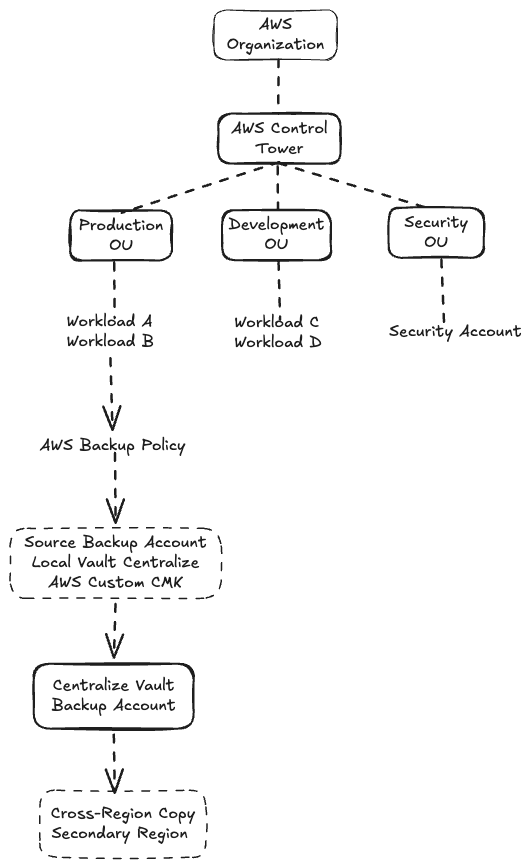
The important design principle is that backup data is separated from the workload accounts. If a production account is compromised, an attacker should not automatically have the same level of control over the backup environment.
Prerequisites
Before implementing the AWS Control Tower and AWS Backup integration, make sure that you have the following foundational elements in place:
- An existing AWS Organization governed by AWS Control Tower
- Administrative access to the AWS Organizations management account
- Enable AWS Backup in your AWS Organization
- Enable AWS Backup Policy in your AWS Organization
- Use custom Customer Managed Keys (CMK), and IAM roles for AWS Backup
Step 1 — Create a Dedicated Backup Account
The first step is to create a dedicated AWS account for Centralize Backup infrastructure. For example: backup-prod
Purpose: Centralized AWS Backup infrastructure
The Backup Account should not host normal application workloads. Its primary purpose is to host:
- AWS Backup
- AWS Backup Vault (example-local-backup-vault)
- AWS KMS CMK
- Backup policies
- Backup monitoring
Step 2 — Create the Customer Managed Key For Source Account
The backup vault should be encrypted using an AWS KMS Customer Managed Key.
Example CMK for Source Account (alias/example-prod-workload-cmk):
This separation provides an additional security boundary.
1
2
3
4
5
6
7
8
9
10
11
12
13
14
15
16
17
18
19
20
21
22
23
24
25
26
27
28
29
30
31
32
33
34
35
36
37
38
39
40
41
42
43
44
45
46
47
48
49
50
51
52
53
54
55
56
57
58
59
60
61
62
63
64
65
66
67
68
69
70
71
72
73
74
75
76
77
78
79
80
81
82
83
84
85
86
87
88
89
90
91
92
93
94
95
96
97
98
99
100
101
102
103
104
105
106
107
108
109
110
111
112
113
114
115
116
117
118
119
120
121
122
123
124
125
126
127
128
129
130
131
132
133
134
135
136
137
138
139
140
141
142
143
144
145
146
147
148
149
150
151
152
153
154
155
156
157
158
159
160
161
162
163
164
165
166
167
168
169
170
171
172
173
174
175
176
177
178
179
180
181
182
183
184
185
186
187
188
189
190
191
192
193
194
195
196
197
198
{
  "Version": "2012-10-17",
  "Id": "cmk-workload-template",
  "Statement": [
    {
      "Sid": "EnableRootPermissions",
      "Effect": "Allow",
      "Principal": {
        "AWS": "arn:aws:iam::<SOURCE_ACCOUNT_ID>:root"
      },
      "Action": "kms:*",
      "Resource": "*"
    },
    {
      "Sid": "AllowEC2EBSUsage",
      "Effect": "Allow",
      "Principal": { "AWS": "*" },
      "Action": [
        "kms:Encrypt",
        "kms:Decrypt",
        "kms:ReEncrypt*",
        "kms:GenerateDataKey*"
      ],
      "Resource": "*",
      "Condition": {
        "StringEquals": {
          "kms:CallerAccount": "<SOURCE_ACCOUNT_ID>",
          "kms:ViaService": "ec2.<REGION>.amazonaws.com"
        }
      }
    },
    {
      "Sid": "AllowEC2EBSGrant",
      "Effect": "Allow",
      "Principal": { "AWS": "*" },
      "Action": [
        "kms:CreateGrant",
        "kms:ListGrants"
      ],
      "Resource": "*",
      "Condition": {
        "StringEquals": {
          "kms:CallerAccount": "<SOURCE_ACCOUNT_ID>",
          "kms:ViaService": "ec2.<REGION>.amazonaws.com"
        },
        "Bool": {
          "kms:GrantIsForAWSResource": "true"
        }
      }
    },
    {
      "Sid": "AllowRDSUsage",
      "Effect": "Allow",
      "Principal": { "AWS": "*" },
      "Action": [
        "kms:Encrypt",
        "kms:Decrypt",
        "kms:ReEncrypt*",
        "kms:GenerateDataKey*"
      ],
      "Resource": "*",
      "Condition": {
        "StringEquals": {
          "kms:CallerAccount": "<SOURCE_ACCOUNT_ID>",
          "kms:ViaService": "rds.<REGION>.amazonaws.com"
        }
      }
    },
    {
      "Sid": "AllowRDSGrant",
      "Effect": "Allow",
      "Principal": { "AWS": "*" },
      "Action": [
        "kms:CreateGrant",
        "kms:ListGrants"
      ],
      "Resource": "*",
      "Condition": {
        "StringEquals": {
          "kms:CallerAccount": "<SOURCE_ACCOUNT_ID>",
          "kms:ViaService": "rds.<REGION>.amazonaws.com"
        },
        "Bool": {
          "kms:GrantIsForAWSResource": "true"
        }
      }
    },
    {
      "Sid": "AllowEFSUsage",
      "Effect": "Allow",
      "Principal": { "AWS": "*" },
      "Action": [
        "kms:Encrypt",
        "kms:Decrypt",
        "kms:ReEncrypt*",
        "kms:GenerateDataKey*"
      ],
      "Resource": "*",
      "Condition": {
        "StringEquals": {
          "kms:CallerAccount": "<SOURCE_ACCOUNT_ID>",
          "kms:ViaService": "elasticfilesystem.<REGION>.amazonaws.com"
        }
      }
    },
    {
      "Sid": "AllowEFSGrant",
      "Effect": "Allow",
      "Principal": { "AWS": "*" },
      "Action": [
        "kms:CreateGrant",
        "kms:ListGrants"
      ],
      "Resource": "*",
      "Condition": {
        "StringEquals": {
          "kms:CallerAccount": "<SOURCE_ACCOUNT_ID>",
          "kms:ViaService": "elasticfilesystem.<REGION>.amazonaws.com"
        },
        "Bool": {
          "kms:GrantIsForAWSResource": "true"
        }
      }
    },
    {
      "Sid": "AllowAWSBackupSourceDescribeKey",
      "Effect": "Allow",
      "Principal": {
        "AWS": "arn:aws:iam::<SOURCE_ACCOUNT_ID>:role/aws-service-role/backup.amazonaws.com/AWSServiceRoleForBackup"
      },
      "Action": "kms:DescribeKey",
      "Resource": "*"
    },
    {
      "Sid": "AllowAWSBackupSourceCryptoOps",
      "Effect": "Allow",
      "Principal": {
        "AWS": "arn:aws:iam::<SOURCE_ACCOUNT_ID>:role/aws-service-role/backup.amazonaws.com/AWSServiceRoleForBackup"
      },
      "Action": [
        "kms:Decrypt",
        "kms:ReEncrypt*",
        "kms:GenerateDataKey*"
      ],
      "Resource": "*"
    },
    {
      "Sid": "AllowAWSBackupSourceGrant",
      "Effect": "Allow",
      "Principal": {
        "AWS": "arn:aws:iam::<SOURCE_ACCOUNT_ID>:role/aws-service-role/backup.amazonaws.com/AWSServiceRoleForBackup"
      },
      "Action": [
        "kms:CreateGrant",
        "kms:ListGrants"
      ],
      "Resource": "*",
      "Condition": {
        "Bool": {
          "kms:GrantIsForAWSResource": "true"
        }
      }
    },
    {
      "Sid": "AllowVaultAccountDecrypt",
      "Effect": "Allow",
      "Principal": {
        "AWS": "arn:aws:iam::<VAULT_ACCOUNT_ID>:role/aws-service-role/backup.amazonaws.com/AWSServiceRoleForBackup"
      },
      "Action": [
        "kms:DescribeKey",
        "kms:Decrypt",
        "kms:ReEncryptFrom",
        "kms:GenerateDataKey*"
      ],
      "Resource": "*"
    },
    {
      "Sid": "AllowVaultAccountGrant",
      "Effect": "Allow",
      "Principal": {
        "AWS": "arn:aws:iam::<VAULT_ACCOUNT_ID>:role/aws-service-role/backup.amazonaws.com/AWSServiceRoleForBackup"
      },
      "Action": [
        "kms:CreateGrant",
        "kms:ListGrants",
        "kms:RevokeGrant"
      ],
      "Resource": "*",
      "Condition": {
        "Bool": {
          "kms:GrantIsForAWSResource": "true"
        }
      }
    }

  ]
}
Step 3 — Create a Central Backup Vault
In the Backup Account, create a dedicated AWS Backup Vault. Example: CentralBackupVault
The vault becomes the central destination for recovery points created from workload accounts. The backup vault should have a vault access policy that restricts which AWS accounts and IAM principals can perform operations against it. This is an important security control.
The goal is not simply to centralize the vault, but also to ensure that workload accounts cannot arbitrarily delete or manipulate centralized recovery points.
Step 4 — Create the Customer Managed Key For Vault Account
Example CMK for Source Account (alias/example-prod-workload-cmk):
This separation provides an additional security boundary.
1
2
3
4
5
6
7
8
9
10
11
12
13
14
15
16
17
18
19
20
21
22
23
24
25
26
27
28
29
30
31
32
33
34
35
36
37
38
39
40
41
42
43
44
45
46
47
48
{
  "Version": "2012-10-17",
  "Id": "example-prod-backup-vault-cmk-policy",
  "Statement": [
    {
      "Sid": "EnableRootPermissions",
      "Effect": "Allow",
      "Principal": {
        "AWS": "arn:aws:iam::<VAULT_ACCOUNT_ID>:root"
      },
      "Action": "kms:*",
      "Resource": "*"
    },
    {
      "Sid": "AllowAWSBackupServiceUseOfKey",
      "Effect": "Allow",
      "Principal": {
        "AWS": "arn:aws:iam::<VAULT_ACCOUNT_ID>:role/aws-service-role/backup.amazonaws.com/AWSServiceRoleForBackup"
      },
      "Action": [
        "kms:Encrypt",
        "kms:Decrypt",
        "kms:ReEncrypt*",
        "kms:GenerateDataKey*",
        "kms:DescribeKey"
      ],
      "Resource": "*"
    },
    {
      "Sid": "AllowAWSBackupServiceToManageGrants",
      "Effect": "Allow",
      "Principal": {
        "AWS": "arn:aws:iam::<VAULT_ACCOUNT_ID>:role/aws-service-role/backup.amazonaws.com/AWSServiceRoleForBackup"
      },
      "Action": [
        "kms:CreateGrant",
        "kms:ListGrants",
        "kms:RevokeGrant"
      ],
      "Resource": "*",
      "Condition": {
        "Bool": {
          "kms:GrantIsForAWSResource": "true"
        }
      }
    }
  ]
}
Step 5 — Configure AWS Backup Policies On AWS Organization
AWS Organizations backup policies allow backup configuration to be managed centrally.
A policy sample json :
The exact retention period should be based on the organization’s business and compliance requirements.
1
2
3
4
5
6
7
8
9
10
11
12
13
14
15
16
17
18
19
20
21
22
23
24
25
26
27
28
29
30
31
32
33
34
35
36
37
38
39
40
41
42
43
44
45
46
47
48
49
50
51
52
53
54
55
56
57
58
59
60
61
62
63
64
65
66
67
68
69
70
71
72
73
74
75
76
77
78
79
80
81
82
83
84
85
86
87
88
89
90
91
92
93
94
95
96
97
98
99
100
101
102
103
104
105
106
107
108
109
110
111
112
113
114
115
116
117
118
119
120
121
122
123
124
125
126
127
128
{
    "plans": {
        "example-prod-standard-daily-tiered-backup": {
            "regions": {
                "@@assign": [
                    "ap-southeast-1"
                ]
            },
            "rules": {
                "daily-tier0-local-backup": {
                    "schedule_expression": {
                        "@@assign": "cron(10 17 ? * * *)"
                    },
                    "start_backup_window_minutes": {
                        "@@assign": "60"
                    },
                    "complete_backup_window_minutes": {
                        "@@assign": "300"
                    },
                    "lifecycle": {
                        "delete_after_days": {
                            "@@assign": "2"
                        }
                    },
                    "target_backup_vault_name": {
                        "@@assign": "example-local-backup-vault"
                    },
                    "recovery_point_tags": {
                        "example:cost-center": {
                            "tag_key": {
                                "@@assign": "example:cost-center"
                            },
                            "tag_value": {
                                "@@assign": "Backup"
                            }
                        },
                        "example:backup-type": {
                            "tag_key": {
                                "@@assign": "example:backup-type"
                            },
                            "tag_value": {
                                "@@assign": "Daily"
                            }
                        },
                        "example:backup-region": {
                            "tag_key": {
                                "@@assign": "example:backup-region"
                            },
                            "tag_value": {
                                "@@assign": "SG"
                            }
                        },
                        "example:backup-tier": {
                            "tag_key": {
                                "@@assign": "example:backup-tier"
                            },
                            "tag_value": {
                                "@@assign": "Tier0"
                            }
                        },
                        "example:env": {
                            "tag_key": {
                                "@@assign": "example:env"
                            },
                            "tag_value": {
                                "@@assign": "prod"
                            }
                        }
                    },
                    "copy_actions": {
                        "arn:aws:backup:ap-southeast-1:centralize-id-account:backup-vault:example-prod-central-vault": {
                            "target_backup_vault_arn": {
                                "@@assign": "arn:aws:backup:ap-southeast-1:centralize-id-account:backup-vault:example-prod-central-vault"
                            },
                            "lifecycle": {
                                "delete_after_days": {
                                    "@@assign": "7"
                                }
                            }
                        }
                    }
                }
            },
            "backup_plan_tags": {
                "example:backup-tiering": {
                    "tag_key": {
                        "@@assign": "example:backup-tiering"
                    },
                    "tag_value": {
                        "@@assign": "daily"
                    }
                }
            },
            "selections": {
                "tags": {
                    "tiered-selection": {
                        "iam_role_arn": {
                            "@@assign": "arn:aws:iam::$account:role/service-role/AWSBackupDefaultServiceRole"
                        },
                        "tag_key": {
                            "@@assign": "example:priority-backup"
                        },
                        "tag_value": {
                            "@@assign": [
                                "yes"
                            ]
                        }
                    }
                }
            },
            "advanced_backup_settings": {
                "ec2": {
                    "windows_vss": {
                        "@@assign": "enabled"
                    }
                },
                "s3": {
                    "backup_acls": {
                        "@@assign": "enabled"
                    },
                    "backup_object_tags": {
                        "@@assign": "enabled"
                    }
                }
            }
        }
    }
}
Step 6 — Implementation
After preparing the AWS Organization, AWS Control Tower, AWS Backup, and the centralized Backup Vault, we need to configure the required IAM roles, backup plan, resource tagging, and vault access policy.
The following configuration is required for the source accounts and the centralized Backup Vault account.
- Required IAM Roles in Source Accounts
Each source account that will be protected by AWS Backup needs the required AWS Backup service roles. There are two important roles that need to be available. AWSServiceRoleForBackup AWS Backup uses the service-linked role:
AWSServiceRoleForBackup with the managed policy:
AWSBackupServiceLinkedRolePolicyForBackup
This service-linked role allows AWS Backup to perform operations on supported AWS resources on behalf of the account. The role should use the AWS-managed service-linked policy:
AWSBackupServiceLinkedRolePolicyForBackup
Step 7 — Tag Resources That Need to Be Backed Up**
The backup plan does not necessarily need to target every resource in the AWS environment. For this implementation, I use resource tagging to identify which resources should be protected.
The required tag is:
Tag Key : example:priority-backup Tag Value : yes**
1
2
3
4
EC2 Instance
|
+-- Name: production-web-01
+-- Tag: example:priority-backup = yes
Another example:
1
2
3
4
RDS Instance
|
+-- Name: production-db
+-- Tag: example:priority-backup = yes
The backup selection can then use the tag:
example:priority-backup = yes
This gives us a simple way to control which resources are included in the backup plan. The objective of this implementation is not simply to create backups. The architecture is designed to establish a separation between the workload account and the backup account.
1
2
3
4
5
6
7
+------------------------+       +--------------------------+
|     Source Account     |       |       Vault Account      |
|                        |       |                          |
| EC2 / RDS / EBS / etc. |       | Centralized Backup Vault |
|                        |------>|                          |
| AWS Backup             |       | KMS CMK                  |
+------------------------+       +--------------------------+
This provides an additional security boundary for backup data. If a workload account is compromised, the centralized Backup Vault should remain protected by its own account-level and vault-level access controls.
This is particularly important for ransomware scenarios, accidental deletion, and compromised administrator credentials. The next step is to test not only whether the backup succeeds, but whether the recovery point can actually be restored successfully.
A backup strategy is only as good as its ability to recover the workload when it is needed.